 kbird · Kristopher Richards
Calculator Vault
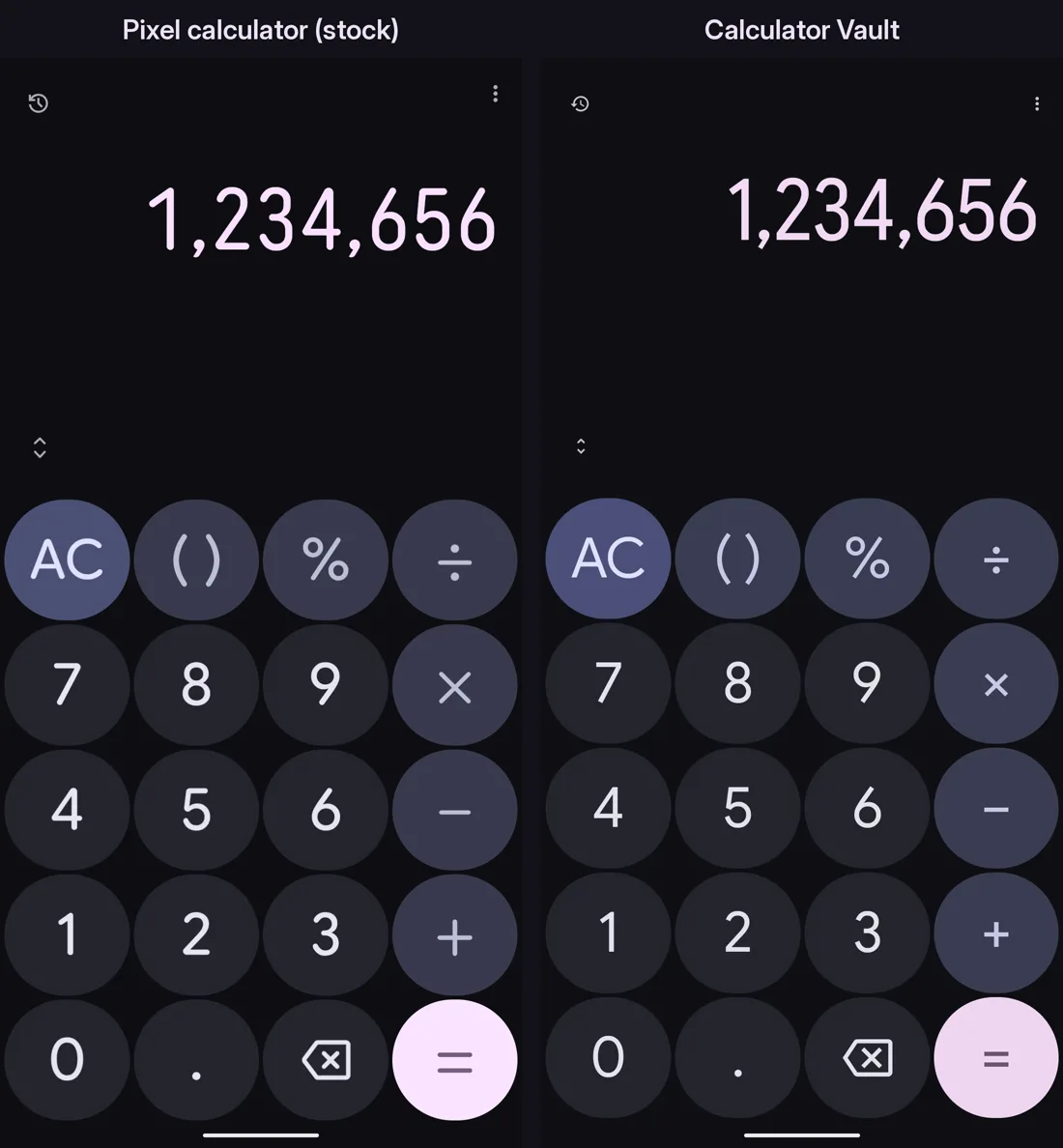
A working calculator with a hidden, encrypted notepad behind it. Type your PIN on the keypad as a plain number and press =. Instead of a result, your private notes open. Anyone else just sees a calculator that calculates.
This is v1: a small, early release, shared while it is being built in public. It is not on the Play Store yet, so you install it by sideloading the APK.
Android 12L (API 32) or newer.
See it
29 seconds, no sound. The PIN in the demo is a throwaway.
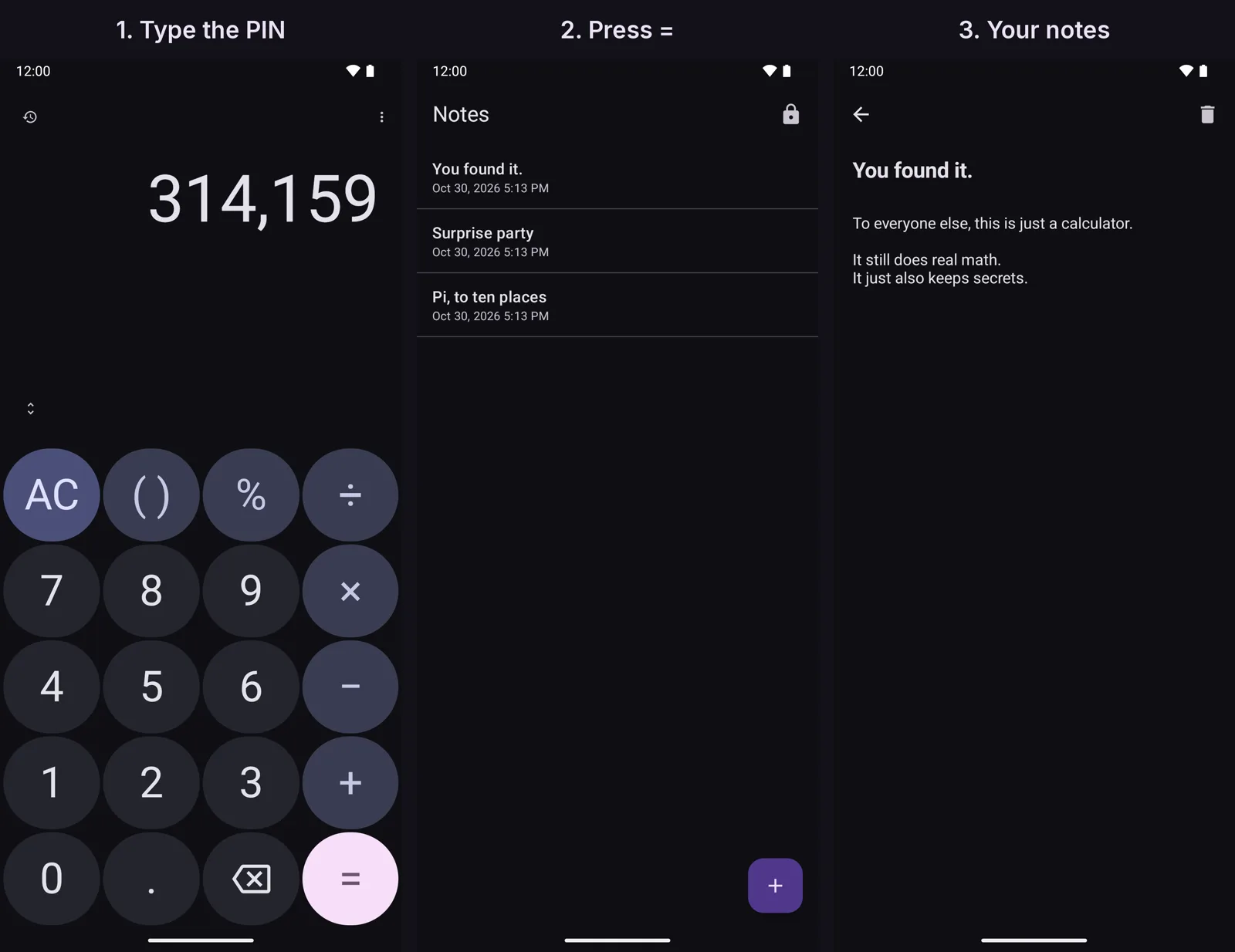
=, and the notes open.What v1 does
- A real calculator. Correct precedence, parentheses, percent, a scientific pad with Deg/Rad, live preview, history that survives restarts, and light, dark, or system themes.
- One hidden vault. A 4 to 12 digit PIN opens encrypted notes you can create, edit, and delete. They autosave.
- Stays on the phone. No internet permission, no accounts, no analytics, no notifications. App backup is off, and vault screens are hidden from screenshots and the recents view.
Install
- Download
calculator-vault-v1.0.apkabove or from the GitHub release. - Optional but recommended: check the hash and signing certificate below.
- Open the APK on your phone and allow installs from that source when Android asks. Play Protect may warn about an app it does not recognize; that is expected for an app outside the Play Store.
- Open the app (it is labeled Calculator). With the display empty, long-press
=and enter your new PIN twice. - From then on, type your PIN and press
=to open the vault.
There is no PIN reset in v1. If you forget your PIN, your notes are gone. That is deliberate: nothing else can unlock them.
Hide the stock calculator
Two calculators on one phone is a giveaway, so hide the original once Calculator Vault is installed. Menu names vary by phone and Android version.
- Easiest, no computer: Settings › Apps › See all apps › Calculator (the original) › Disable. On a Pixel the stock calculator is a system app and can't be uninstalled normally; disabling hides it and stops it.
- With adb (Pixel package shown; find yours with
adb shell pm list packages | grep -i calc):
adb shell pm disable-user --user 0 com.google.android.calculatorOn a Pixel, pm uninstall --user 0 is refused for this system app without root, so disable-user is the way. To undo, re-enable it in Settings or run adb shell pm enable com.google.android.calculator. Then drag Calculator Vault to where the old icon was.
Verify the download
APK SHA-256:
a11aa0d91680809b0048c6514e913ba97ce2234084d3598227104b83a055dc14Signing certificate SHA-256:
d0:73:60:89:91:56:ef:8b:dd:78:13:35:01:8b:f7:1b:c9:ef:22:2f:50:97:06:80:15:41:c2:77:46:a3:c4:38Check with sha256sum calculator-vault-v1.0.apk and apksigner verify --print-certs calculator-vault-v1.0.apk, or on the phone with an app such as AppVerifier. Every release is signed with the same key. Full steps are in the README.
Security, honestly
- Your PIN goes through PBKDF2-HMAC-SHA256 (600,000 iterations, random salt) to make a 256-bit key. Each note is sealed with AES-256-GCM. No PIN hash is stored.
- The vault locks the moment the app leaves the screen. Repeated wrong PINs trigger lockouts that grow up to 24 hours.
- A short PIN can still be brute-forced offline by someone who copies the app's private data from a rooted or forensically imaged phone. Use a longer PIN for stronger protection.
- It hides the vault, not the app. It is camouflage, not deniability against a determined, technical adversary.
- This is early software and has not had an independent security audit. Do not rely on it for anything life-critical.
Found a security problem? Email [email protected] rather than opening a public issue.
What's next
v1 is the foundation. Bigger things are in progress, including more than one vault on the same calculator and room for more than notes. No dates yet. Follow along on @kbird_ai.
Calculator Vault is not affiliated with or endorsed by Google. Its look is modeled on a stock Android calculator so it blends in; no code, icons, fonts, or assets from any other app are included.